Know what each buyer cares about
Give every buyer their own link to a live map of your listing. You see how often they come back, how long they stay, which places they open, and what they ask.
A profile for every buyer
Each buyer you add gets a card. It fills in on its own as they use the map, so you walk into the next call knowing what matters to them.
Hot. Three visits, ten minutes on the map, or a question asked.
Warm. Came back, stayed two minutes, or opened a few places.
Looked. Opened it and left.
Not opened yet. Time for a nudge.
Buyers are told the agent sees which places they open. Website visitors stay anonymous until they send a question with their email.
Sample profile. Real profiles fill in from your buyers' taps.
Two ways to get it to buyers
Same map, same profiles. Use one or both.
Text or email each buyer their own link
- Add the buyer. Name and email.
- Tap Text. Messages opens with the note and their link filled in. Or copy it, or email it.
- Watch their card. Visits, places and questions land on their profile.
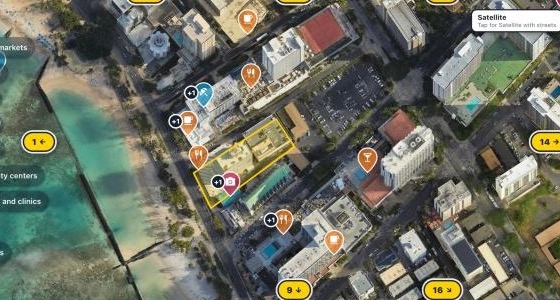 2500 Kalākaua Ave, Waikīkīparcelsheet.org
Paste one short code on the listing page
- Tap Embed on the saved map and copy the code.
- Paste it into your listing page, or forward the picture guide to whoever runs your site.
- Visitors show up as website visitors, and as named leads once they ask a question.
Have a CRM? Add your own client id to the link and each visitor's taps come back under that id.
What your buyer sees
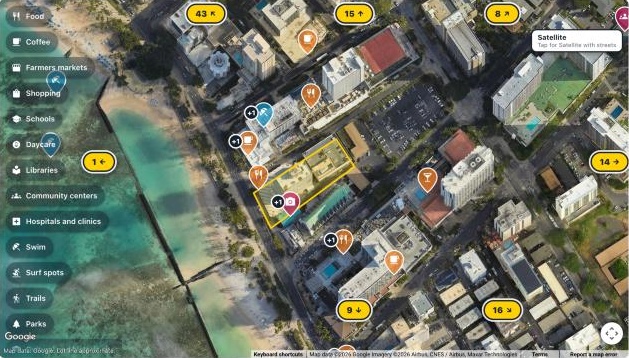
A client map for a lot on Kalākaua Avenue, Waikīkī, Oʻahu. The lot outlined, places nearby with a photo and a distance, and an Ask the agent button.
Type your listing's address
The lot shows on the map with the places nearby, each with a photo.
Pick what buyers see
Add your own pins and draw the drive to work or school.
Save, then send or paste
Type your email and tap the link we send. You get the buyer links and the code for your website.
Questions agents ask
Does one map cover my whole website?
One map covers one listing. Make a map for each listing you want on your site, and send its buyer links from that map. Profiles from every map show together under Client profiles.
Do buyer profiles cost extra?
No. Adding buyers, their links, their profiles and their opens are all free. You pay 3 credits to make the map and 1 credit a month to keep it live. Satellite or Street View taps: 50 a month included, then 1 credit per 50 more.
What if I run out of credits?
We email you first and the map stays live for a week. After that it pauses until you add credits, and the same link comes back for everyone you sent it to. Turn on auto top up and it never pauses.
Do I need a ParcelSheet plan?
No. Client maps run on credits alone, $1 each. Buy a pack of 5 or more from your account page whenever you need them. Pro adds 20 credits every month plus lot sheets, videos and the rest of ParcelSheet.
Which areas work?
Every Hawaiʻi island and most of the mainland. Type the address and the map finds the lot. If a lot does not come up, write to nick@parcelsheet.org and we will look.
Make your first map for $3
Add your first buyer as soon as it saves.